

Channels live inside AI Agents. That module comes turned on for the owner and
administrators; for sellers it comes turned off, unless an administrator turns it on for them.
If you do not see the buttons to reconnect or repair, ask an administrator of your workspace.
My agent stopped replying to my customers
What is happening. Almost always the connection with Meta needs attention: the access expired, a permission is missing, or the connection is being restored. A paused subscription also leaves your agents silent. What to do. Open the conversation in your Inbox. Below the message that did not go out, Eva writes the reason in one line, with Fix connection beside it. For example: Eva lost access and needs to reconnect. or Eva needs its permissions restored to keep answering. Fix connection takes you to that channel’s page — Messenger or Instagram — inside your agent, where Eva opens the repair window with the action that fits: Reconnect when the access expired or a permission is missing, Repair now when Eva is restoring the connection, and Verify connection to confirm it stuck. The owner and administrators see that link; everyone else sees Ask an administrator. If the conversation shows no reason at all, check whether there is a billing notice in Settings → Subscription.Messages arrive, but another application answers
What is happening. On Messenger or Instagram, Meta lets several apps serve the same Page. When another app is the default one, Eva receives the messages but cannot reply. The conversation says it like this: Another app is answering these conversations. What to do. Select Fix connection in the conversation. Eva gives you the exact steps and the buttons Open in Meta and Copy instructions, in case someone else administers the Page. The steps are these: in the Page settings, go to Advanced messaging, then to Conversation routing, and leave Eva (goeva.ai) as the default handler. Come back to Eva and use Verify connection.Instagram is not delivering direct messages to Eva
What is happening. Instagram does not share your direct messages until you authorize access for connected tools. Without that permission, Eva sees no direct messages at all. What to do. In the Instagram app, open Settings and then Messages and story replies. Go into Connected tools and turn on Allow access to messages. Come back to Eva and use Verify connection. If it is still the same, there is a second switch on the Facebook side: on the linked Page, open Settings, then Linked accounts, go into Instagram, and turn on access to Instagram messages in Inbox. That one needs a computer and an administrator with full control.I connected the channel and nothing happens
What is happening. It is not always broken. A freshly connected Messenger or Instagram shows as Setup required until your agent successfully answers a real message on that channel. An inbound message alone is not enough: the label clears once Meta accepts Eva’s reply. What to do. Send a message from another account or another phone, the way a customer would. On that channel’s page, inside your agent, use Test now if it appears. You have confirmed it works when the message appears in your Inbox and your agent replies.My WhatsApp message will not send, or it says Awaiting approval
What is happening. WhatsApp only allows free replies during the 24 hours following the customer’s last message. After that, every outgoing message needs WhatsApp’s approval. What to do. On a number used only in Eva, and with a customer who had already written to you, you do not have to go find a template. If your agent is still carrying the conversation, start with Take conversation and write. Then type your message and send it as always: Eva prepares the reopening behind the scenes and the message shows Awaiting approval for a few minutes. The shortcut In a hurry? Send an approved template appears right there if you do not want to wait.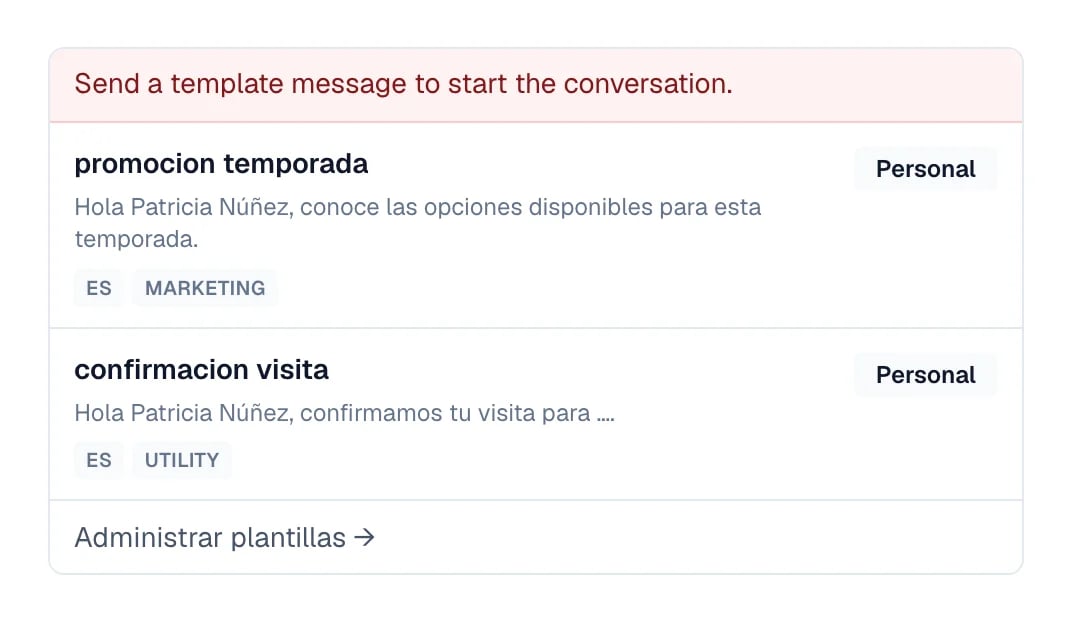
The notice above the reply box once the 24-hour window has closed.
This window belongs to the WhatsApp API. A personal WhatsApp connected to Eva does not use Eva’s
automatic reopening-template flow. Even so, sending from Eva still requires a message from the
customer within the last 24 hours; after that, write from the phone. What changes between a
number used only in Eva and one you keep using in the
WhatsApp Business app is in
After you connect WhatsApp.