

What you will get
One TikTok screen per agent that tells the truth per capability. Ads comments, messages, organic comments, mentions and leads each show their own status: connecting TikTok Ads never turns on a capability that TikTok has not approved.1
Open your agent's channels
Go to AI Agents, open the agent, then Channels.
2
Open the TikTok screen
Choose TikTok. The Account section shows whether TikTok Ads is connected for this agent.
3
Connect TikTok Ads
Select Connect TikTok Ads, sign in to TikTok for Business, and choose the advertiser accounts this agent may use. Back in Eva, the Permissions and health section lists each connection with its status.
Set up leads
Leads from Instant Forms and from direct messages reach your CRM through the Leads section. Each source is set up on its own and stays Waiting on TikTok until TikTok verifies it.1
Choose the source
In Leads, select Set up next to Instant Form leads or Message leads. Pick the TikTok Ads connection (only when you have more than one), then whether the leads belong to an Advertiser or a Form library. Instant Form leads also need the Page ID of the form that collects them; both ids are in TikTok Ads Manager.
2
Copy the webhook address
After Save, Eva shows the webhook address once. Select Copy and paste it in TikTok as the webhook for that lead source. If you lose the address, select Change to generate a new one.
3
Verify
Once TikTok has saved the webhook and approved lead access, select Verify. The row changes from Waiting on TikTok to Ready.
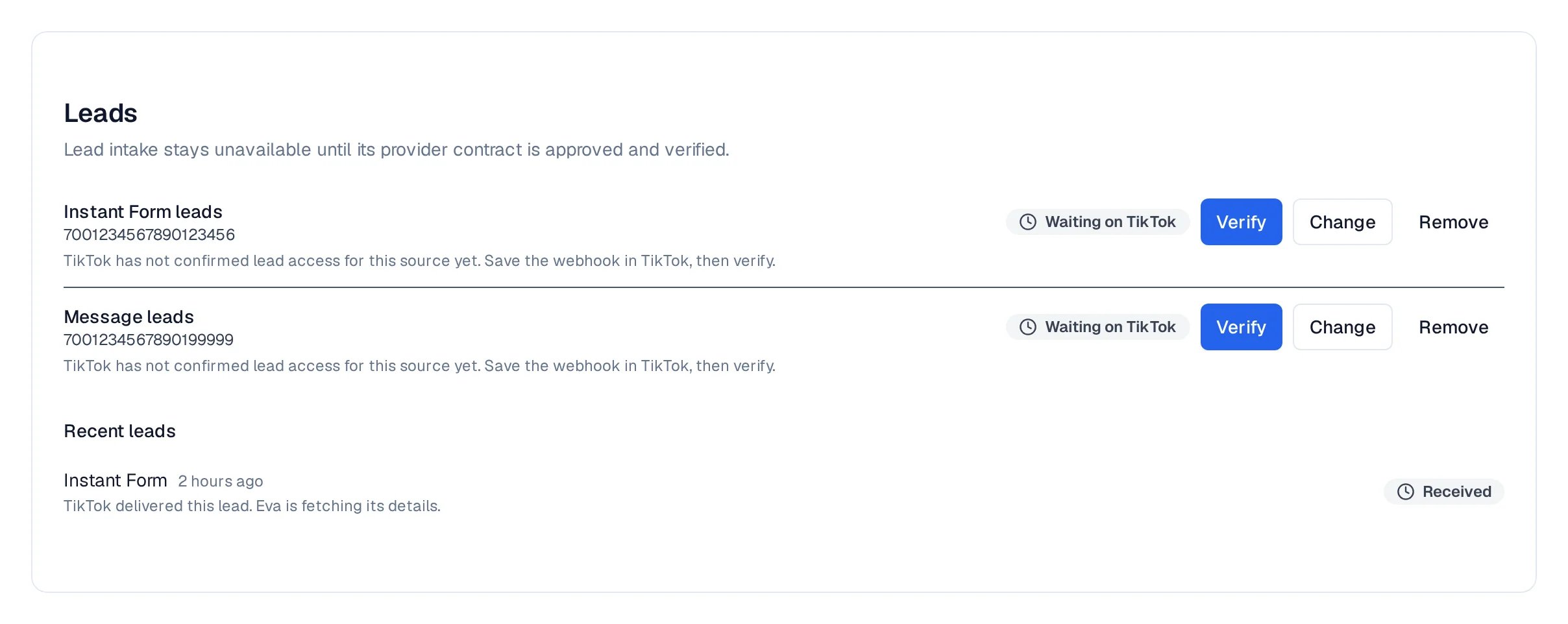
The Leads section with both sources configured and waiting for TikTok, and the first lead received.
Where leads go
Leads follow your routing rules: in Pipelines, then Lead routing, the TikTok source appears next to your other channels, and you choose the funnel that receives it. Without a rule, Eva creates the contact only.If something looks stuck
- The row says Waiting on TikTok: Eva has everything it needs; TikTok has not verified the source yet. Save the webhook in TikTok, wait for TikTok’s approval, then select Verify.
- TikTok Ads is connected but messages are not available: business messages need a separate approval from TikTok and a TikTok Business account. The Messages section shows the exact state.
- To stop receiving leads from a source, select Remove on that row. Leads already in your CRM stay where they are.