> ## Documentation Index
> Fetch the complete documentation index at: https://docs.goeva.ai/llms.txt
> Use this file to discover all available pages before exploring further.
# Keep WhatsApp connected and recover it
> Stop WhatsApp from disconnecting, and resolve partial history, missing messages, restricted numbers, and the Meta errors you see by code.
This guide covers mostly the numbers that keep using the WhatsApp Business app. The last section, the one about Meta errors, applies to both types of connection.
## What Eva knows about your app
Eva does not know when you last opened WhatsApp Business. What it sees is the activity that number reflects into Eva, and from there it works out the margin you have left.
In **Settings** → **Members**, the **Seller numbers** panel shows **Last activity** per number. Opening **Details**, the **Keep active** field states how many days remain before 13 days without activity are reached. When there is no recorded activity yet, Eva only recommends opening the app regularly.
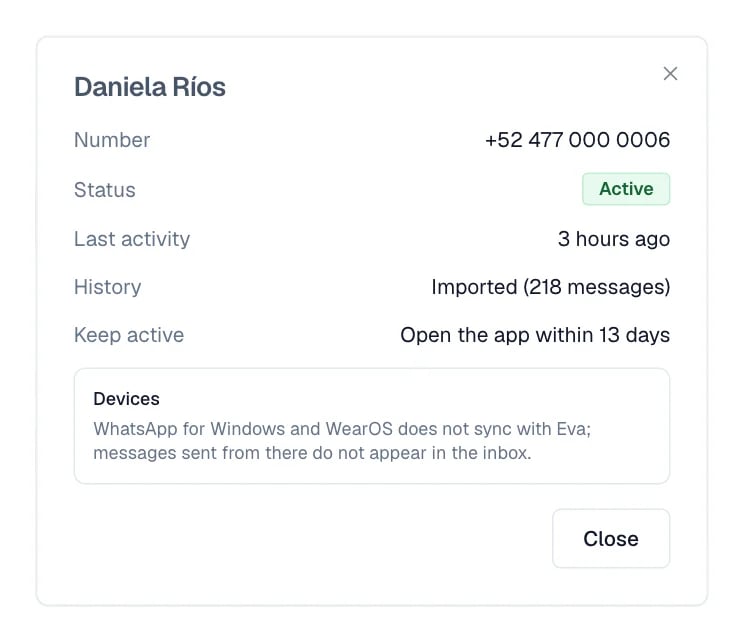 At 10 days without activity, Eva sends a notice to the person who holds that number, if that person has notifications turned on. That notice is a reminder, not a guarantee: the 13-day limit runs the same either way.
If the phone stays switched off, without internet, or without the app installed for a long time, Meta can cut the link. Recovering it means connecting again and confirming on the phone.
## Read the number status
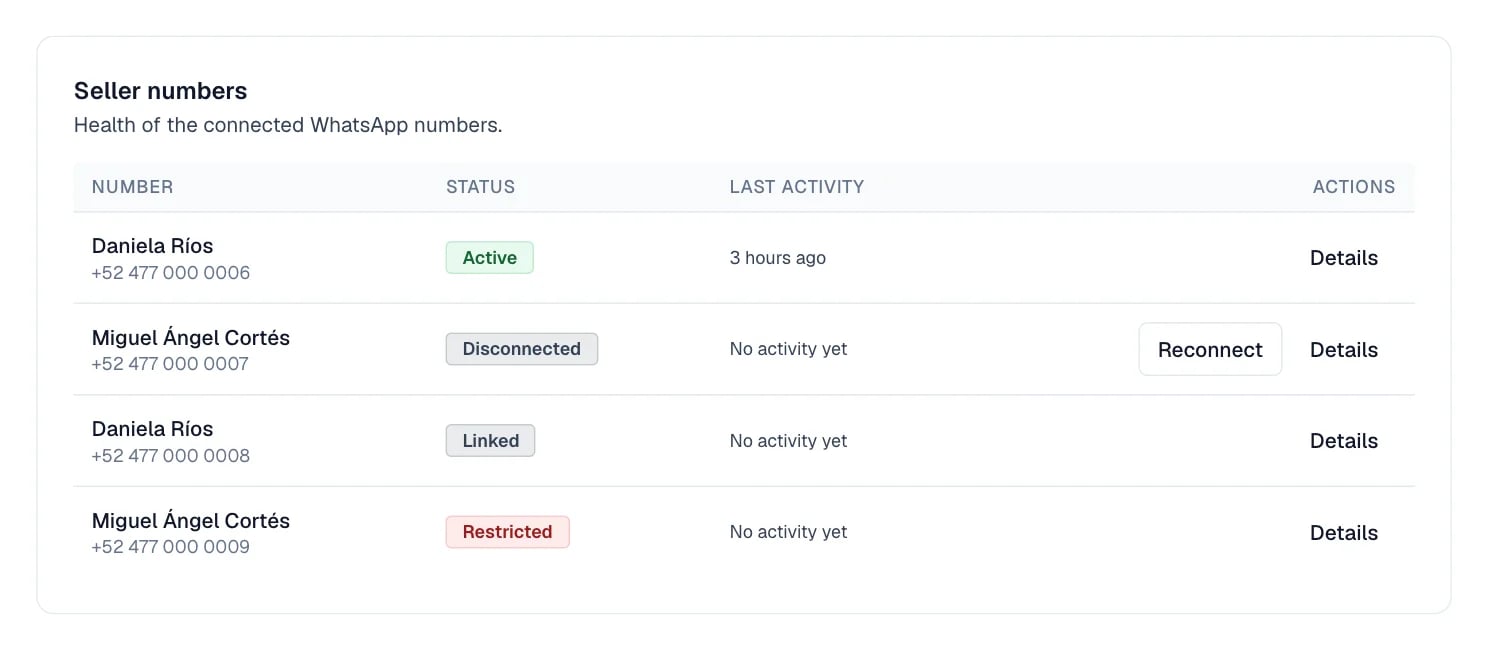
The **Seller numbers** panel sums up each number in one label:
* **Linked**: the connection exists, but Eva does not see activity from that number yet.
* **Importing history**: the initial import is still running.
* **Active**: Eva is receiving activity from the number. This is the normal state.
* **Possible missing message**: one or more messages from the phone may not have synced.
* **Disconnected**: the link went down. **Reconnect** appears here.
* **Restricted**: Meta applied a temporary restriction to the number.
Every row ends in **Details**. In the **Actions** column, **Reconnect** appears only on rows whose status is **Disconnected**.
At 10 days without activity, Eva sends a notice to the person who holds that number, if that person has notifications turned on. That notice is a reminder, not a guarantee: the 13-day limit runs the same either way.
If the phone stays switched off, without internet, or without the app installed for a long time, Meta can cut the link. Recovering it means connecting again and confirming on the phone.
## Read the number status
The **Seller numbers** panel sums up each number in one label:
* **Linked**: the connection exists, but Eva does not see activity from that number yet.
* **Importing history**: the initial import is still running.
* **Active**: Eva is receiving activity from the number. This is the normal state.
* **Possible missing message**: one or more messages from the phone may not have synced.
* **Disconnected**: the link went down. **Reconnect** appears here.
* **Restricted**: Meta applied a temporary restriction to the number.
Every row ends in **Details**. In the **Actions** column, **Reconnect** appears only on rows whose status is **Disconnected**.
 ## Partial history and missing messages
A partial history notice means the initial import brought only part of it. Eva states the date from which messages exist; older ones stay on the phone. New conversations keep syncing.
**Possible missing message** warns about a gap: review that stretch in the app before continuing the conversation. Both notices are about incomplete visibility, not about a broken connection.
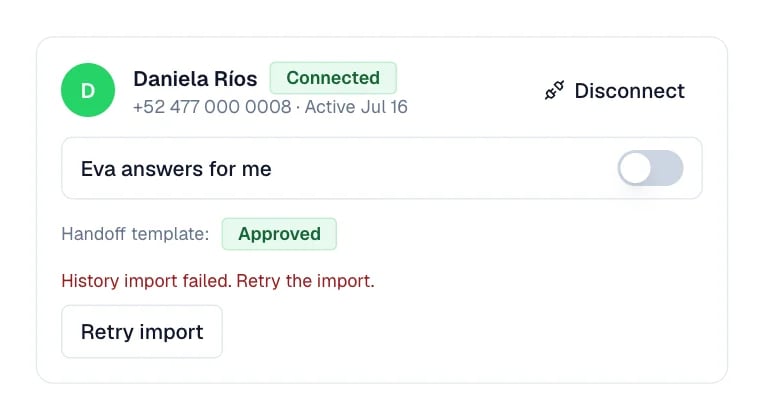
If the import fails, Eva offers **Retry import** on the number's card. That card sits one level deeper. In **Settings** → **Members**, select that member's number in the **WhatsApp** column, and open there the number that still lives in the WhatsApp Business app. If the request was declined from the phone at the time, the only way forward is to connect the number again.
## Partial history and missing messages
A partial history notice means the initial import brought only part of it. Eva states the date from which messages exist; older ones stay on the phone. New conversations keep syncing.
**Possible missing message** warns about a gap: review that stretch in the app before continuing the conversation. Both notices are about incomplete visibility, not about a broken connection.
If the import fails, Eva offers **Retry import** on the number's card. That card sits one level deeper. In **Settings** → **Members**, select that member's number in the **WhatsApp** column, and open there the number that still lives in the WhatsApp Business app. If the request was declined from the phone at the time, the only way forward is to connect the number again.
 ## Reconnect only when Eva asks
When the status reads **Disconnected**, select **Reconnect** in that same row. Approve the link again in Meta and confirm on the phone.
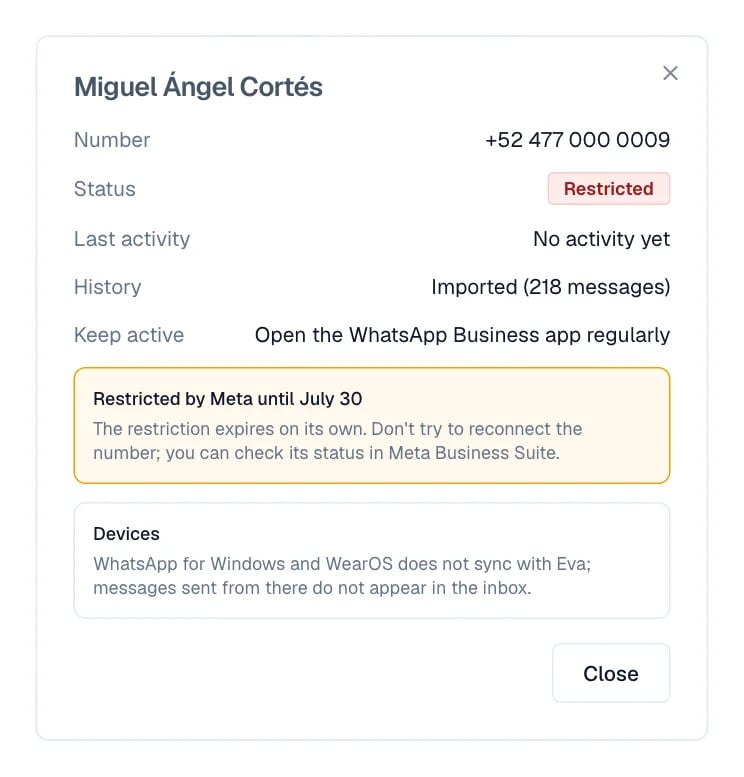
Do not reconnect a restricted number. When the status is **Restricted**, the row carries no **Reconnect**, and that is on purpose. The restriction expires on its own, and retrying can make it worse. In **Details**, Eva states the date it lasts until if Meta reports that date, and shows **Temporary Meta restriction active** if Meta does not. You can also check the status in Meta Business Suite.
## Reconnect only when Eva asks
When the status reads **Disconnected**, select **Reconnect** in that same row. Approve the link again in Meta and confirm on the phone.
Do not reconnect a restricted number. When the status is **Restricted**, the row carries no **Reconnect**, and that is on purpose. The restriction expires on its own, and retrying can make it worse. In **Details**, Eva states the date it lasts until if Meta reports that date, and shows **Temporary Meta restriction active** if Meta does not. You can also check the status in Meta Business Suite.
 Before disconnecting a number completely, keep this in mind. If you later try to connect it again through this path, Eva asks again, on the first screen, whether that number was already registered on the WhatsApp Business API. Meta locks the numbers that were, for 1 to 2 months. Reconnecting when Eva asks you to does not go through that question.
## If messages are missing
1. Check the partial history notice or **Possible missing message** in Eva.
2. Open the original conversation on the phone to see what did not arrive.
3. Confirm that WhatsApp Business is open and has internet.
4. Ask for a test message from another phone.
5. If new messages do not arrive either, use **Reconnect** when the status calls for it, or [contact support](/en/help/contact).
## Linked devices
When you connect the number, linked devices are signed out. WhatsApp Web in the browser and WhatsApp for Mac link again without trouble. WhatsApp for Windows and for WearOS cannot be linked again, and that is a Meta rule for this type of connection.
If you try it with WhatsApp for Windows, the app accepts the code, stays on **Loading your chats** and signs you out two minutes later. It happens on every attempt. Use the browser instead.
If the browser signs you out too, open WhatsApp Business on the phone, go to **Linked devices** and remove the ones you no longer use. Then link the browser one again. The limit is four devices.
What is sent from WhatsApp for Windows and WearOS is not reflected in Eva. Use the primary phone or the Eva Inbox for the messages you need to see there.
## Meta errors by code
This code has two different causes. When connecting a dedicated number, it is almost always the two-step verification of the phone where that number has WhatsApp. Turn it off there and use **Retry registration**. When connecting with the app, Meta treats it as a number already registered on another API account. It has to be released from the previous account.
Eva uses this code for WhatsApp Business accounts restricted by Meta, and it also appears in send failures tied to the payment method. Review both in Meta Business Suite before retrying. While the restriction stays active, repeating the connection does not help.
This code is ambiguous by Meta's design. Eva uses it for three situations: a number or account that is not eligible, a marketing-send restriction, and a missing payment method. Start with the cheapest one to check, the payment method in Meta; if that is in order, try later or use another number.
Meta locks the number for up to 72 hours after several attempts in a row. Eva shows the countdown and disables the retry button while it lasts. Waiting is the safest way out; if you cannot wait, connecting another number is the fastest.
Copy the exact message, the affected number, and the approximate time. Then [contact support](/en/help/contact), without disconnecting or deleting the number.
## I can't connect my number (the Meta window closes without connecting)
During **Connect WhatsApp**, Eva keeps the exact result that Meta returns. If Meta says the connection was cancelled or could not be completed, read the step shown on the card, then open the Meta window again and complete that step before returning to Eva. When Meta provides an error message, Eva shows that message on the same card.
If the Meta window closes without a result, reopen it and finish every screen. Confirm that you selected the right business and WhatsApp Business number, keep the WhatsApp Business app open and online, and complete any verification Meta requests.
If Meta says the number is not eligible or cannot be used, follow this order:
1. Update the WhatsApp Business app.
2. If the number may be registered with another WhatsApp API provider, have that provider release it first.
3. After repeated attempts, wait about one hour.
4. Retry the connection.
If Meta shows a QR step, open WhatsApp Business on the phone, open **Linked devices**, and scan the QR code Meta shows.
After a second failed attempt, copy the support context from the card and include it when you [contact support](/en/help/contact). It lets support find the connection attempt without asking you to repeat the whole flow.
## Next steps
* [What changes once the number is connected](/en/channels/whatsapp/after-connecting)
* [Where your number is today](/en/channels/whatsapp)
Before disconnecting a number completely, keep this in mind. If you later try to connect it again through this path, Eva asks again, on the first screen, whether that number was already registered on the WhatsApp Business API. Meta locks the numbers that were, for 1 to 2 months. Reconnecting when Eva asks you to does not go through that question.
## If messages are missing
1. Check the partial history notice or **Possible missing message** in Eva.
2. Open the original conversation on the phone to see what did not arrive.
3. Confirm that WhatsApp Business is open and has internet.
4. Ask for a test message from another phone.
5. If new messages do not arrive either, use **Reconnect** when the status calls for it, or [contact support](/en/help/contact).
## Linked devices
When you connect the number, linked devices are signed out. WhatsApp Web in the browser and WhatsApp for Mac link again without trouble. WhatsApp for Windows and for WearOS cannot be linked again, and that is a Meta rule for this type of connection.
If you try it with WhatsApp for Windows, the app accepts the code, stays on **Loading your chats** and signs you out two minutes later. It happens on every attempt. Use the browser instead.
If the browser signs you out too, open WhatsApp Business on the phone, go to **Linked devices** and remove the ones you no longer use. Then link the browser one again. The limit is four devices.
What is sent from WhatsApp for Windows and WearOS is not reflected in Eva. Use the primary phone or the Eva Inbox for the messages you need to see there.
## Meta errors by code
This code has two different causes. When connecting a dedicated number, it is almost always the two-step verification of the phone where that number has WhatsApp. Turn it off there and use **Retry registration**. When connecting with the app, Meta treats it as a number already registered on another API account. It has to be released from the previous account.
Eva uses this code for WhatsApp Business accounts restricted by Meta, and it also appears in send failures tied to the payment method. Review both in Meta Business Suite before retrying. While the restriction stays active, repeating the connection does not help.
This code is ambiguous by Meta's design. Eva uses it for three situations: a number or account that is not eligible, a marketing-send restriction, and a missing payment method. Start with the cheapest one to check, the payment method in Meta; if that is in order, try later or use another number.
Meta locks the number for up to 72 hours after several attempts in a row. Eva shows the countdown and disables the retry button while it lasts. Waiting is the safest way out; if you cannot wait, connecting another number is the fastest.
Copy the exact message, the affected number, and the approximate time. Then [contact support](/en/help/contact), without disconnecting or deleting the number.
## I can't connect my number (the Meta window closes without connecting)
During **Connect WhatsApp**, Eva keeps the exact result that Meta returns. If Meta says the connection was cancelled or could not be completed, read the step shown on the card, then open the Meta window again and complete that step before returning to Eva. When Meta provides an error message, Eva shows that message on the same card.
If the Meta window closes without a result, reopen it and finish every screen. Confirm that you selected the right business and WhatsApp Business number, keep the WhatsApp Business app open and online, and complete any verification Meta requests.
If Meta says the number is not eligible or cannot be used, follow this order:
1. Update the WhatsApp Business app.
2. If the number may be registered with another WhatsApp API provider, have that provider release it first.
3. After repeated attempts, wait about one hour.
4. Retry the connection.
If Meta shows a QR step, open WhatsApp Business on the phone, open **Linked devices**, and scan the QR code Meta shows.
After a second failed attempt, copy the support context from the card and include it when you [contact support](/en/help/contact). It lets support find the connection attempt without asking you to repeat the whole flow.
## Next steps
* [What changes once the number is connected](/en/channels/whatsapp/after-connecting)
* [Where your number is today](/en/channels/whatsapp)